I'm all in with the hyperkey! But let me explain. The hyperkey is a concept of how to get additional modifier keys when running out of regular keyboard shortcuts. I first stumbled upon the idea a couple of years ago and I think Brett Terpstra in 2017 was the first one who mentioned it and coined the term, at least as I'm aware of. Back then he started using an app called Karabiner Elements which is still up to date and well maintained in order to make use of the seldomly pressed caps lock key instead of a key combination of all four modifier keys SHIFT + CONTROL + OPTION + COMMAND. The app allowed mapping that combination of those four modifier keys to just one single key, the caps lock key. With such a new, easily accessible combination of modifier keys it was now possible for him to assign a completely new set of fresh keyboard shortcuts in order to make his keyboard lifestyle fly.
For quite a while I thought that I don't need such fancy stuff which seemed only to be made for keyboard nerds. But since I started using more complex apps, apps like Adobe Photoshop or Affinity Photo, or dedicated video editing apps like DaVinci Resolve which all come with a lot of rather complex keyboard shortcuts, I started to realize that some of my frequently used shortcuts were already in use by those apps. With the help of Keyboard Maestro's conflict palettes I even realized that there are some keyboard conflicts that I wasn't really aware of in the beginning.
That's when the idea of a hyperkey started to become more appealing to me. But fiddling with another app just to be able to invoke the caps key as a hyperkey seemed a little bit daunting and overkill to me. Luckily I realized that the Better Touch Tool app has a similar functionality built in. It's possible and actually rather convenient to use the Better Touch Tool app to remap those combined SHIFT + CONTROL + OPTION + COMMAND modifiers to just one key, in my case the caps lock key.
Here I show you how to do it in detail with the help of the BetterTouchTool App. And don't be worried, the caps lock key as you know it, fully retains its original functionality including the LED indicator when used just as one key without using it in a key combination. So let's dive in.
In the BetterTochTool app first select "For all apps" in the very left sidebar, as you want the hyperkey to work across all apps on your computer.
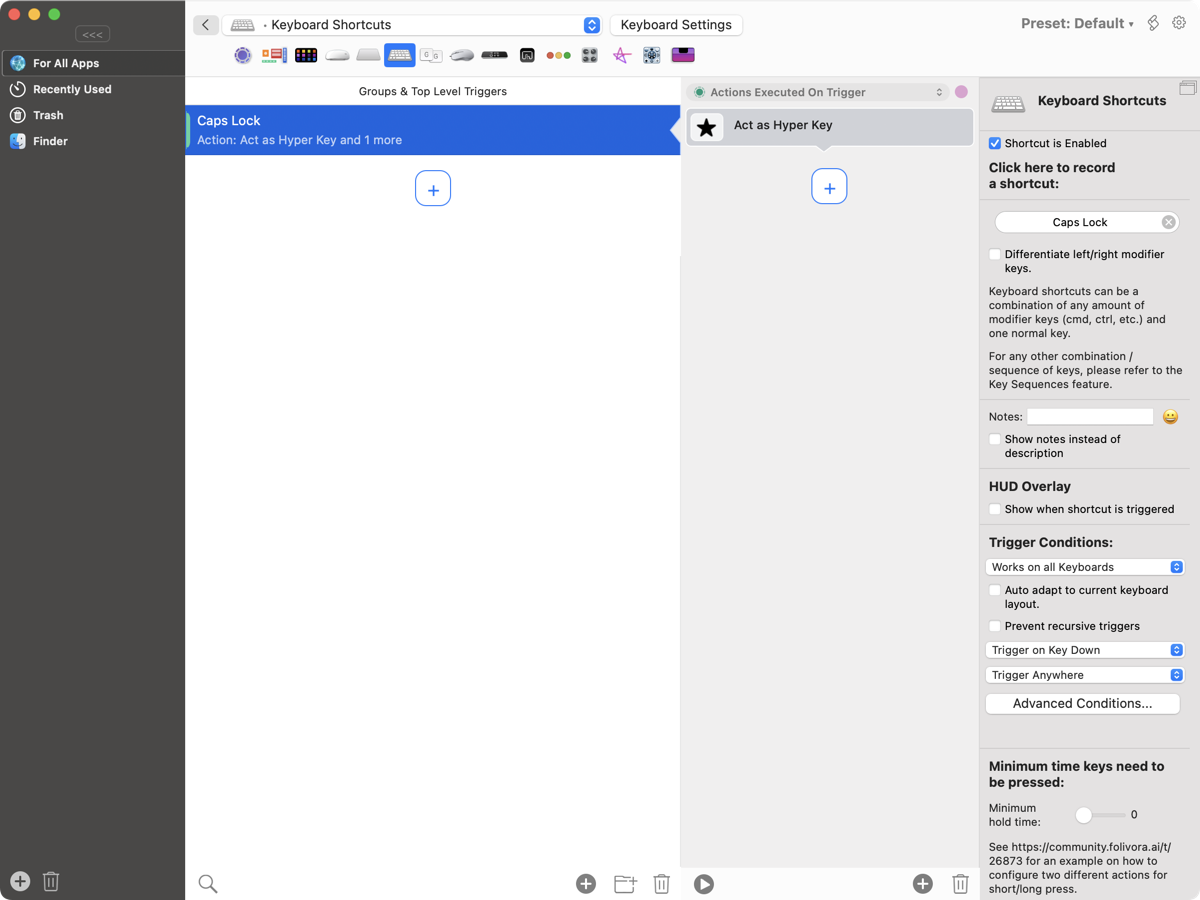
Now add a new keyboard shortcut within the second pane under the section "Keyboard Shortcuts" by hitting the plus sign there.
Assign the designated caps lock key, your new hyperkey, in the very right sidebar under "Click here to record a shortcut".
In the third pane from the left hit the plus sign there under "Assign First Action to Selected Trigger". Look for the trigger "Act as Hyper Key" in the dropdown menu within the section "Keyboard Keys" or just search for it.
Be aware of the topmost line within that same pane which should say "Actions Executed On Trigger".
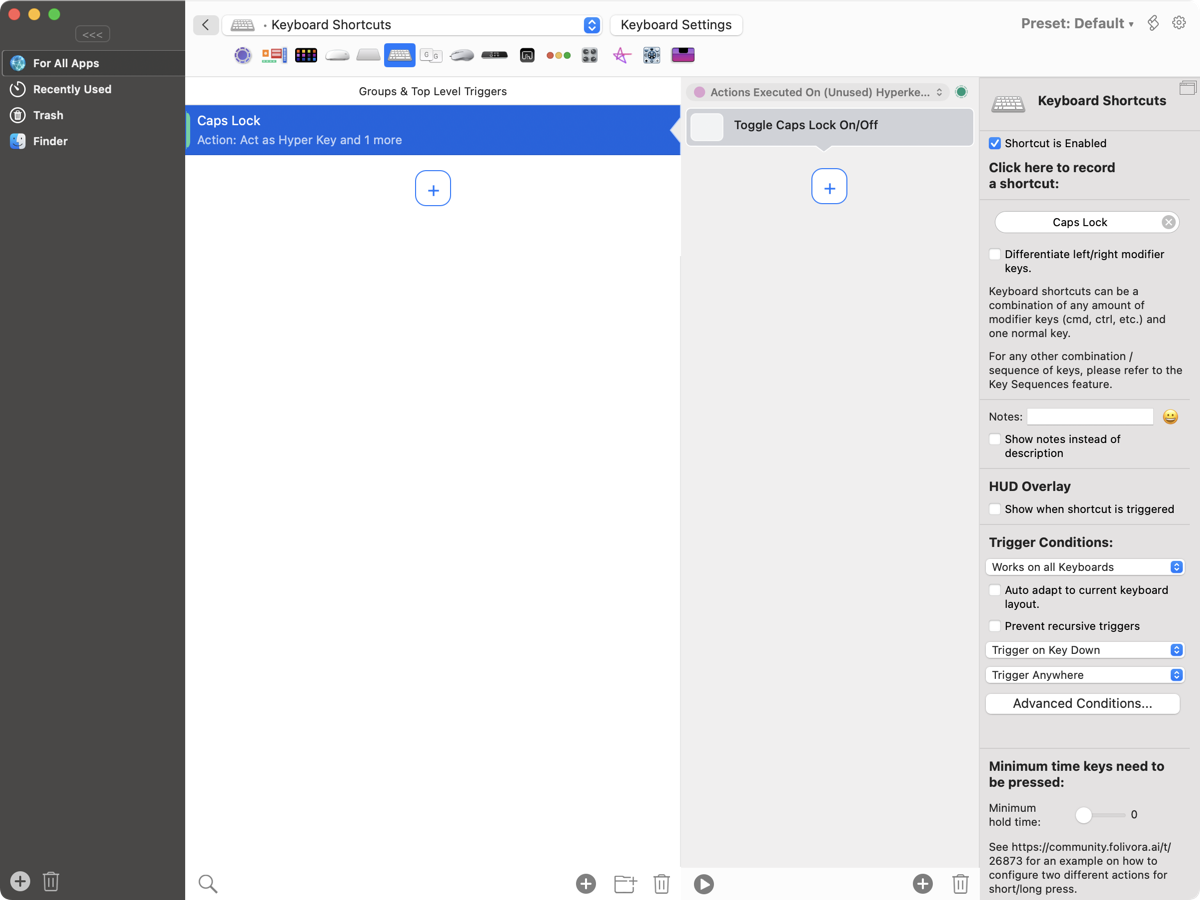
Within that same line now switch over to "Actions Executed On (Unused) Hyperkey Release" by clicking on the line itself. Within this additional section select "Toggle Caps Lock On/Off" in the sidebar on the very right within the dropdown menu. Again the desired function is under the "Keyboard Keys" section.
And you've done it! Your new hyperkey is active. Now you can start mapping some new keyboard shortcuts while using all the modifier keys SHIFT + CONTROL + OPTION + COMMAND at the same time and you'll find out that when using these shortcuts you now can instead use your new hyperkey to trigger those actions. It might be overkill for some but from my experience it makes a lot of shortcuts much more accessible and easier to remember. Try it out for yourself!
If want to know even more tips and tricks about the BetterTochTool app I wrote another post about customizing your own context menus, revealing hidden files in Finder and making use of a middle mouse button by just using your trackpad.